
On this page
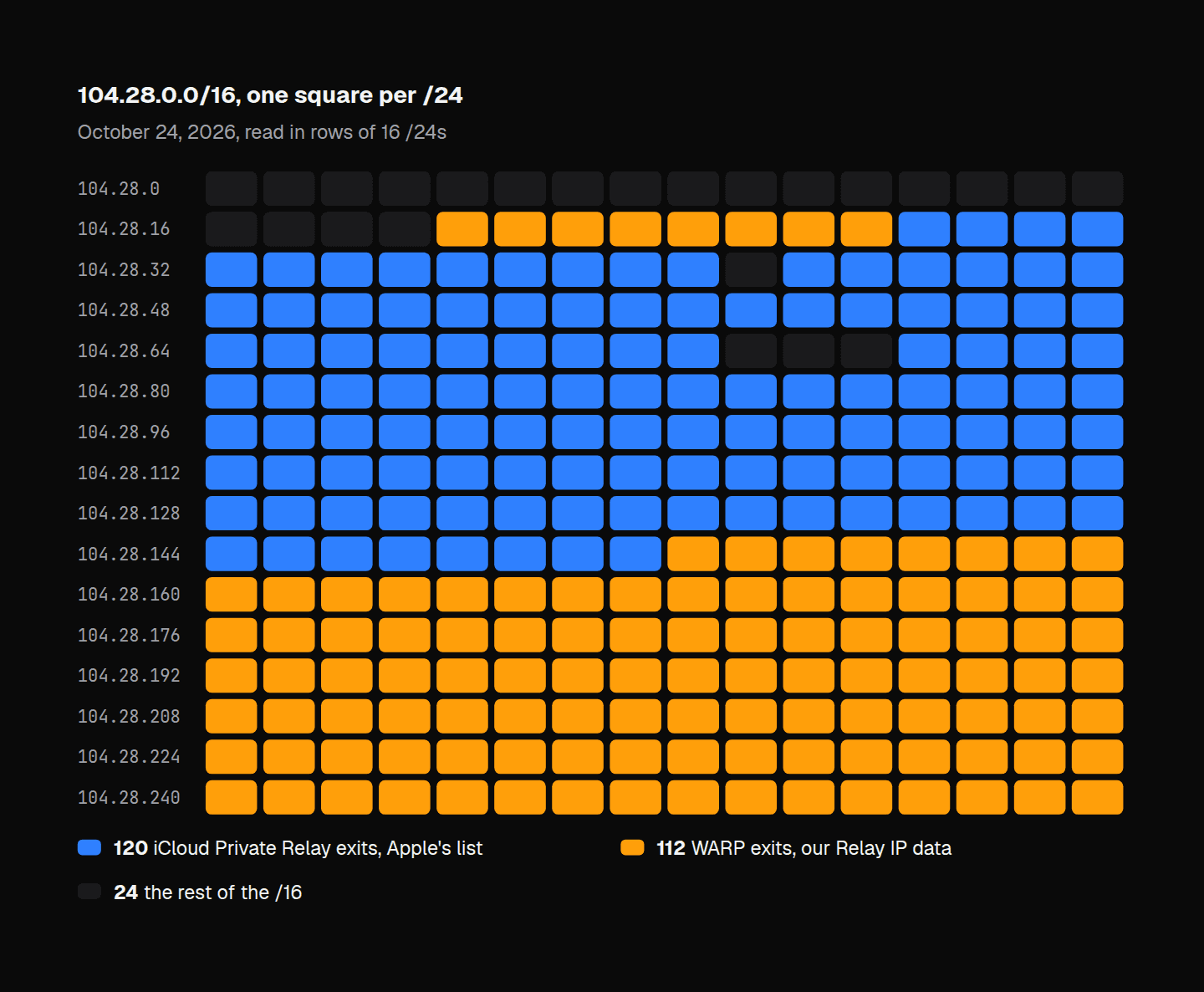
Cloudflare's WARP and Apple's iCloud Private Relay leave Cloudflare's network from the same block, 104.28.0.0/16. On October 24, 2026, our Relay IP data held 28,280 addresses in WARP's 112 exit /24s there, and Apple's list of Private Relay exits held 19,736 in 120 others. No /24 holds both. A rule on the /16, written for WARP, refuses Safari's Private Relay users too, and a lookup per address tells them apart.
What WARP is, and what your server sees
WARP is the tunnel in Cloudflare's 1.1.1.1 app, free on phones and desktops: one switch sends the device's traffic out through Cloudflare. Cloudflare's FAQ says it "replaces your original IP address with a Cloudflare IP that consistently and accurately represents your approximate location", and that this happens "regardless of whether the site is on the Cloudflare network or not". A site behind Cloudflare gets the WARP exit in CF-Connecting-IP, and a site with nothing in front gets it as the address of the connection.
Cloudflare's geofeed, api.cloudflare.com/local-ip-ranges.csv, gives every exit address its own location, and one WARP /24 serves many places at once: it places the addresses of 104.28.209.0/24 in 25 countries.
How sites refuse WARP without meaning to
A site can refuse WARP without a rule that names it. Take two exits that Cloudflare's geofeed places in Atlanta: 104.28.209.115, a WARP exit, and 104.28.32.190, a Private Relay exit on Apple's list. On October 24, 2026, our API answered is_relay true for both, with provider cloudflare_warp for the WARP exit and apple_private_relay for Apple's, and is_vpn false for both: it answers WARP as a relay, like Private Relay, not as a VPN. It answered is_hosting true for the WARP exit and false for Apple's. Here's what the usual rules do with them:
| Rule | WARP, 104.28.209.115 | Private Relay, 104.28.32.190 |
|---|---|---|
Refuse 104.28.0.0/16 | refused | refused |
| Refuse Cloudflare's network, AS13335 | refused | refused |
Refuse is_hosting | refused | let in |
Refuse is_vpn | let in | let in |
Check relay.provider | sent to a check | let in |
Our Hosting IP data puts 20,925 of WARP's 28,280 addresses in the /16 in hosting, and none of Apple's 19,736. It names no provider for them and holds them at medium confidence, so a hosting rule that acts on high alone lets WARP through.
A rule on the whole /16 takes Apple's 120 /24s along with WARP's, and the two sit side by side: WARP's /24s at 104.28.20 to 27 end where Apple's begin, at 104.28.28. A list of WARP's own /24s has to keep up instead: between August 13 and 15, 2026, the WARP exits we saw moved from 104.28.152.0-104.28.167.255 into 104.28.192.0/18, so a list made from exits seen before then missed the block WARP moved to.
Over IPv6, the shared space is a registry name
In RIPE's database, each of the eight /32s in 2a09:bac0::/29 is named CLOUDFLAREWARP. Apple's list puts 13,646 of its 243,359 IPv6 ranges in two of them, 2a09:bac2::/32 and 2a09:bac3::/32, so a rule on that name, or on the /29, refuses every Private Relay user Apple sends out through those two /32s. Our API answers is_relay: true and is_vpn: false for those addresses.
Should you block it?
For signup, login and checkout, send WARP to a check rather than refusing it: email or phone verification at signup, 3-D Secure at payment. It's free and one switch away, so it serves someone opening their tenth account as readily as someone keeping their browsing from their ISP, and the address it gives you still says roughly where the visitor is.
Refuse it where your terms or a licensing deal make you refuse VPNs. Cloudflare's FAQ already warns WARP users that apps which enforce content licensing by location "may not function properly".
Don't rate-limit by address. Cloudflare divides each city's WARP users among its exit addresses, and a shared exit carries other people's history: on October 24, 2026, 4,234 of WARP's 28,280 addresses in the /16 (15%) and 5,794 of Apple's 19,736 (29%) had been seen as residential proxy exits in the previous 90 days, both Atlanta exits among them. A proxy flag on such an address can come from anyone else using the exit, so limit by account or session, and don't refuse a WARP or relay visitor on that flag alone.
Private Relay is a different case: every user pays for iCloud+, and its exits are on Akamai and Fastly as well as Cloudflare. Our post on Private Relay covers why to let it in.
Telling them apart in code
One lookup per visitor, on the address Cloudflare saw, is enough. Here it is in Express 5.3.0 with our Node.js SDK, vpndetection 5.10.1, on Node.js 22.23. Save Cloudflare's ranges next to it first:
npm install express vpndetection
{ curl -s https://www.cloudflare.com/ips-v4; echo
curl -s https://www.cloudflare.com/ips-v6; echo; } > cloudflare-ips.txt// app.js
import { readFileSync } from 'node:fs';
import express from 'express';
import { VPNDetection } from 'vpndetection';
const client = new VPNDetection({ apiKey: process.env.VPNDETECTION_API_KEY });
const cloudflare = readFileSync('cloudflare-ips.txt', 'utf8')
.split('\n')
.filter(Boolean);
const app = express();
// req.ip is the visitor only when the request came from Cloudflare.
app.set('trust proxy', cloudflare);
function decide(result) {
// WARP and Private Relay are both relays: the provider tells them apart.
if (result.relay?.provider === 'cloudflare_warp') {
return { decision: 'verify', network: 'cloudflare_warp' };
}
if (result.isRelay) {
return { decision: 'allow', network: result.relay?.provider ?? 'relay' };
}
if (result.isVpn) {
return { decision: 'block', network: result.vpn?.provider ?? 'vpn' };
}
return { decision: 'allow' };
}
app.post('/signup', async (req, res) => {
let verdict;
try {
verdict = decide(await client.lookup(req.ip));
} catch {
verdict = { decision: 'allow', network: 'unchecked' };
}
res.status(verdict.decision === 'block' ? 403 : 200).json(verdict);
});
app.listen(3000);trust proxy set to Cloudflare's ranges makes req.ip the visitor's address when a request comes through Cloudflare, and the connection's own address when it doesn't. WARP goes to a check, every other relay is let in, Private Relay among them, and any VPN is refused. A failed lookup lets the visitor in, marked unchecked.
We ran it on October 24, 2026, with a key on the Max plan, behind a stand-in for Cloudflare: requests from an address in Cloudflare's published ranges, with the CF-Connecting-IP and X-Forwarded-For headers Cloudflare adds. $APP is the app's address. The visitors were the two Atlanta exits, one of Apple's IPv6 exits for Atlanta, and Mullvad's Atlanta server from Mullvad's own list:
for ip in 104.28.209.115 104.28.32.190 2a09:bac2:6f00::1 45.134.140.130; do
    printf "%-18s " "$ip"
    curl -s --max-time 20 -X POST "$APP/signup" \
        -H "CF-Connecting-IP: $ip" -H "X-Forwarded-For: $ip" -w " %{http_code}\n"
done
104.28.209.115 {"decision":"verify","network":"cloudflare_warp"} 200
104.28.32.190 {"decision":"allow","network":"apple_private_relay"} 200
2a09:bac2:6f00::1 {"decision":"allow","network":"apple_private_relay"} 200
45.134.140.130 {"decision":"block","network":"mullvad"} 403
A Comcast home line, which we don't print, came back {"decision":"allow"}. Then the WARP visitor skipped Cloudflare and connected to the server's own address, with both headers set to that home line. The app looked up the WARP exit, not the header, and answered verify again.
That holds only if you trust the ranges Cloudflare publishes for its proxies. 104.28.0.0/16 is inside Cloudflare's registration at ARIN, 104.16.0.0/12, and outside the published list, which ends at 104.24.0.0/14 in that block. With 104.16.0.0/12 as the trusted range instead, the same request came back {"decision":"allow"}: the app had looked up the home line the visitor wrote.
Run again with no key on November 11, 2026, with vpndetection 5.13.0, the same four visitors got the same decisions, the Mullvad server's without its name:
104.28.209.115     {"decision":"verify","network":"cloudflare_warp"} 200
104.28.32.190      {"decision":"allow","network":"apple_private_relay"} 200
2a09:bac2:6f00::1  {"decision":"allow","network":"apple_private_relay"} 200
45.134.140.130     {"decision":"block","network":"vpn"} 403
is_relay and the relay's provider come back with a key or without one, which is all this code needs to send WARP to a check, and every paid plan adds the vpn object's provider (pricing).
Look up any address with the API, or read every field in the docs. The same answers come as databases for lookups on your own servers: Relay IP, which holds WARP and Private Relay and is free under CC BY-SA 4.0, and VPN IP.