
On this page
IP addresses turn up where you already work: a SIEM alert, a support ticket, an abuse report, a log line someone pasted into a chat. Checking one usually means copying it into another tab. Our Chrome extension, VPNDetection: IP address lookup, answers over the page instead. Select the address, right-click it, and it tells you whether it's a VPN, a proxy, a Tor exit or a hosting provider's, with the country it's in and the network that announces it.
Every answer below is what version 1.2.0 showed on November 9, 2026. Version 1.3.0, which the Chrome Web Store serves since, changes only where the sign-in is kept. The screenshots are signed in on a paid plan. Without an account an answer says less, as the table further down shows.
Look up an address
Add it to Chrome from the Chrome Web Store. Then select an IP address on any page and right-click it. Under VPNDetection: IP address lookup, pick Look up "…" on VPNDetection. The answer opens over the page: a sentence saying what the address is, a pill for each detection, the country with its flag and local time, and the network that announces it.
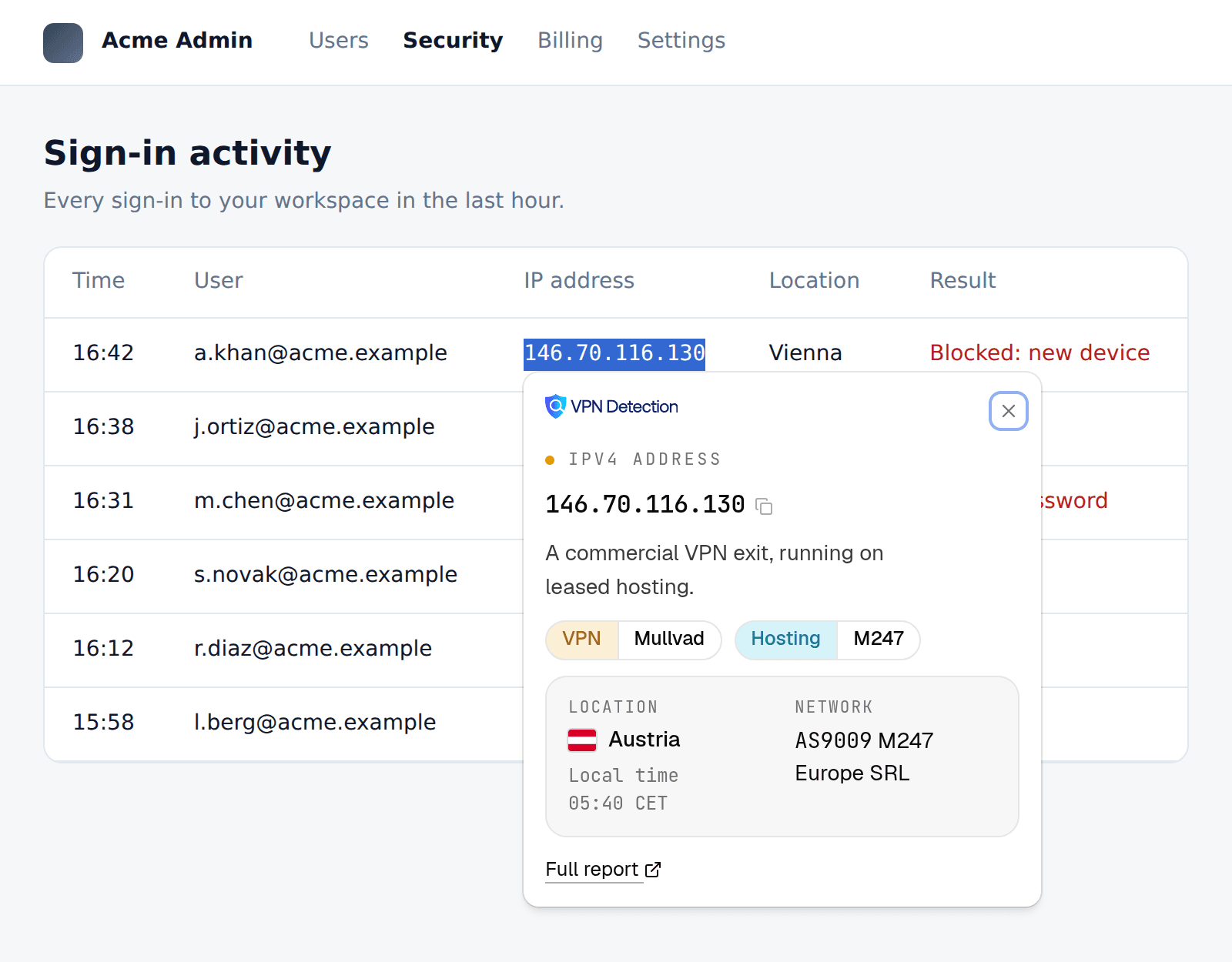
That's 146.70.116.130, the at-vie-wg-001 server in Vienna from Mullvad's own server list.
Alt+Shift+V does the same without the menu (Option+Shift+V on a Mac). The extension's settings choose whether the shortcut opens the answer over the page or the full report, and Chrome's own chrome://extensions/shortcuts page changes the keys. Full report under each answer opens the address's page on vpndetection.io, such as the one for 146.70.116.130. The submenu's second item, Open "…" on vpndetection.io, goes straight there.
Defanged addresses, ports and brackets
An address rarely sits alone. It has a port after it or brackets around it, or it's been defanged so nobody follows it by accident. The extension reads each of these as the address inside:
203.0.113.5:443          [2001:db8::1]:443
203.0.113[.]5            203.0.113(dot)5
2001:db8[:]:1            hxxp://203[.]0[.]113[.]5/login
It answers every address in a selection, the first 10, and looks up an address named twice only once. Here are an incident ticket's indicators, a Tor exit and the same Mullvad server with a source port, both defanged and selected together:
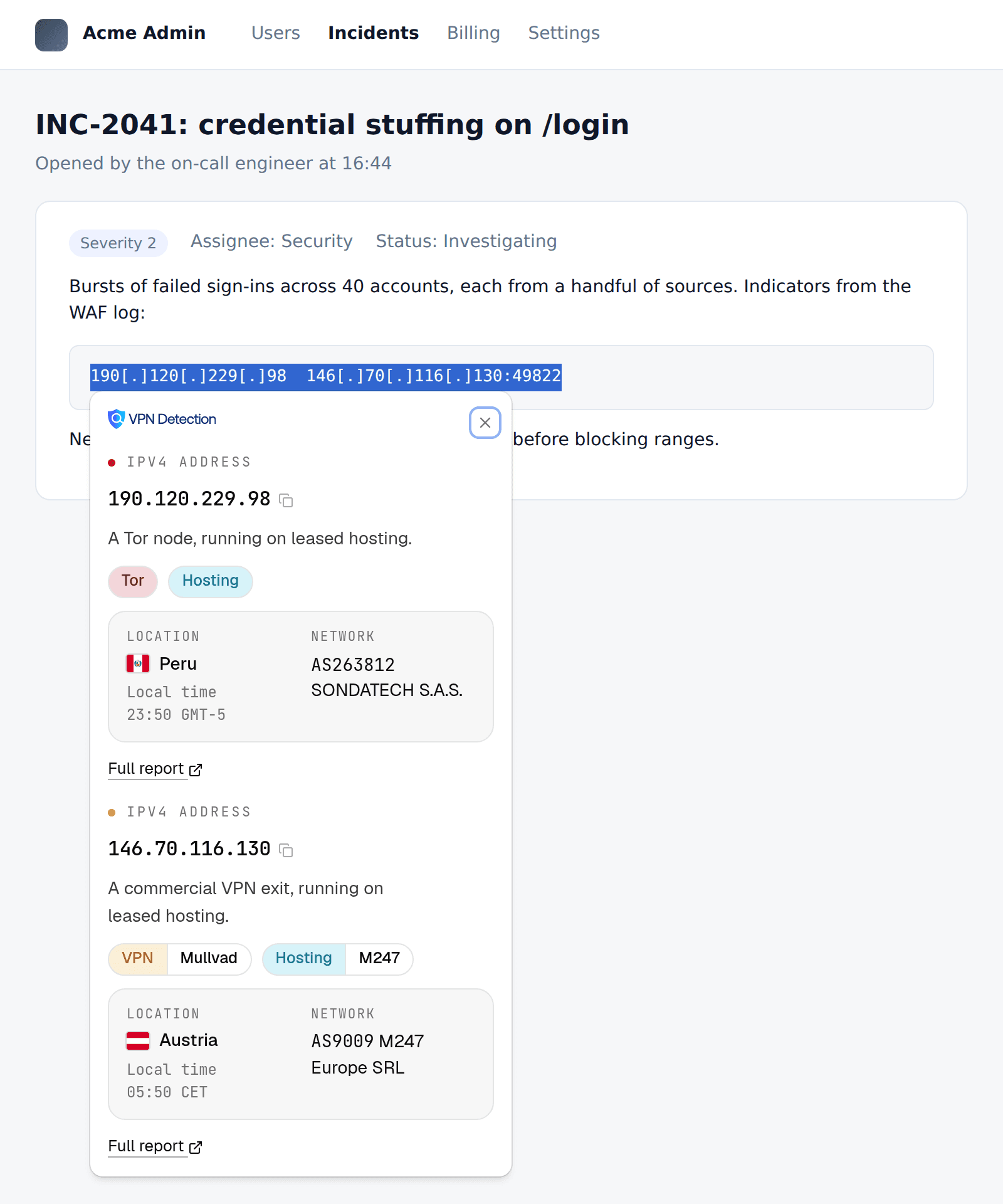
190.120.229.98 was on the Tor Project's exit list on November 9.
Without an account, and signed in
You don't need an account to start. Without one, each answer says whether the address is a VPN and nothing more. Lookups without an account have no daily cap. Sign in and the extension looks up with one of your organization's API keys, so each answer carries what that key's plan includes, and its lookups count against that plan. These are the same three addresses without an account and signed in on a paid plan:
| Address | Without an account | Signed in, paid plan |
|---|---|---|
146.70.116.130 | A commercial VPN exit. | A commercial VPN exit, running on leased hosting. VPN: Mullvad, Hosting: M247. Austria, AS9009 M247 Europe SRL |
2001:ac8:29:b3::f001 | A commercial VPN exit. | A commercial VPN exit, running on leased hosting. VPN: Mullvad, Hosting: M247. Austria, AS9009 M247 Europe SRL |
190.120.229.98 | No VPN seen at this address. | A Tor node, running on leased hosting. Tor, Hosting. Peru, AS263812 SONDATECH S.A.S. |
2001:ac8:29:b3::f001 is the same Mullvad server's IPv6 address. The Tor exit reads "No VPN seen" without an account, because then the extension only asks whether an address is a VPN, and a Tor exit isn't one. Signing in tries every field, 100 lookups a day, and a paid plan answers every field on every lookup. Every paid plan answers every field: the VPN's operator, hosting and CDN, and the residential, datacenter, mobile and public proxy flags.
To sign in, click Sign in in the toolbar popup or in the extension's settings. Chrome opens its own sign-in window on vpndetection.io, so the extension never sees your password. You sign in there, pick the API key it should use and approve, and the window closes itself. Approving needs a role that may share your organization's API keys, which an owner can give you. Without it you're signed in, but lookups answer as they do without an account.
Sign out from the avatar menu in the toolbar popup, or disconnect the extension in the console under Settings > Sessions & devices > Connected applications. It checks once a day that its sign-in still stands, so a disconnect reaches it within a day. Neither changes the key, which stays valid until you rotate it: rotate it in the console if you lose the browser it was shared with.
Page marks
Page marks are off until you turn them on. Turn on Mark the addresses on every page in the extension's settings and every IP address on the pages you visit is underlined. Rest the pointer on one to look it up:
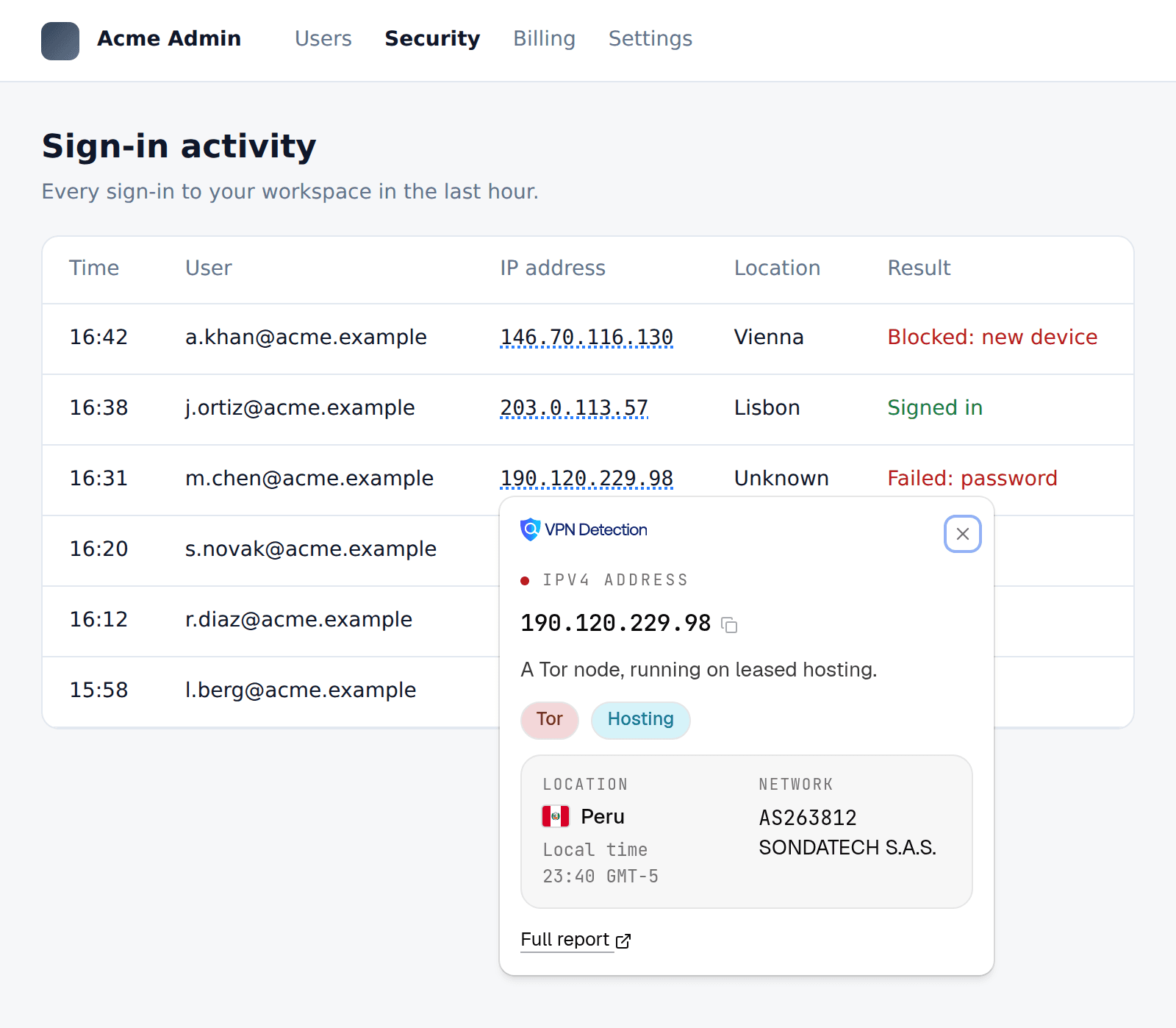
Turning them on asks Chrome for access to every site, which Chrome words as "Read and change all your data on all websites", and nothing else in the extension asks for it. The addresses are found in the page itself, and one leaves the page only when you rest the pointer on it. Marks skip text fields and anything you're editing, and defanged addresses aren't marked, so select those instead. The toolbar popup has a switch that turns marks off for the site you're on.
The toolbar popup
The extension's toolbar button opens a search box for an address you type, with the answer for your own connection under it, as vpndetection.io/myip gives it. Your account and plan sit under your avatar. Answers are kept for an hour, or until you close the browser, so looking an address up again within the hour costs no lookup.
What it asks for
A security team usually vets an extension before anyone may install it. These are the permissions it will see:
| Permission | What it's for |
|---|---|
activeTab | Reads the selection and shows the lookup on the page it was used on, for that one use |
contextMenus | The right-click item that looks up the selected address |
scripting | Shows the lookup over the page, and marks a page's addresses once page marks are on |
storage | Keeps the settings, and an hour of answers, in this browser |
identity | Signs you in on vpndetection.io in the browser's own sign-in window |
alarms | Checks once a day that the sign-in still stands, so disconnecting it in the console signs it out |
| Access to all sites, optional | Asked for only when you turn page marks on |
The sign-in and your API key are kept in the extension's own database, which needs no permission and which no web page can open.
What leaves the page is the address you look up. It reaches our API as any lookup does, with a header saying it came from the Chrome extension, and the API keeps a record of it to meter your plan, support you and investigate abuse, as our privacy policy says.
The same lookups elsewhere
From a terminal, the vpndetection CLI checks a whole access log in one pipeline. In Cursor, VS Code or Claude Code, our MCP server answers the same questions in a chat. The extension's docs page has the rest, including what each message means when a lookup doesn't answer.
Add VPNDetection to Chrome, select an address, and right-click it.